PatchBot keeps your repository’s dependencies up to date automatically. It watches
your package.json, go.mod, Dockerfile, Actions and many more dependency
files, and opens pull requests when updates are available. PatchBot is based on Renovate.
Enable PatchBot on your repository#
Two steps, both required:
Add the topic
patchbotto your repository
(Repo → About section → Manage topics → addpatchbot).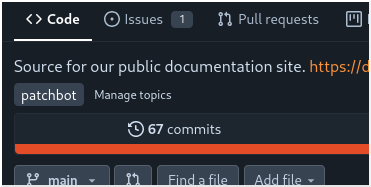
Invite
patchbotas a collaborator with Write access
(Repo → Settings → Collaborators → Add collaborator →patchbot).
The invitation is what lets PatchBot push branches and open pull requests. Without it, PatchBot can see your public repo but cannot create PRs.
What happens next#
- Discovery runs once an hour: within about an hour of enabling PatchBot, it
finds your repo:
- an onboarding pull request appears, setting up a minimal
renovate.json; - a Dependency Dashboard issue appears, listing detected managers and pending updates;
- if PatchBot has detected everything you want to manage, you do not need to touch the
renovate.jsonfile.
- an onboarding pull request appears, setting up a minimal
- After that, update PRs appear whenever new versions are released. Merge them like any other PR.
Runs happen roughly every hour; don’t expect instant PRs after a release.
PatchBot reacts nearly immediately when you tick checkboxes on the Dependency Dashboard. No need to wait for the next run.
Customizing#
PatchBot runs on a fixed platform-wide schedule (roughly hourly), so you can’t
change how often it runs. You can control what it does on each run: your repo’s own
renovate.json sets automerge, grouping, labels, dependency ranges and more. See
Renovate’s configuration docs.
Platform-wide limits apply (PR rate caps), so very large backlogs and rapid dashboard interactions appear gradually, not all at once.
Disable PatchBot#
Remove the patchbot topic from your repository. At the next run (within about
an hour) your repo is no longer managed.
Close or merge any open update PRs yourself; they stay until then.
Questions & problems#
- Check the Dependency Dashboard issue in your repo first.
- Still stuck? Ask in the issue tracker.